June 18, 2026
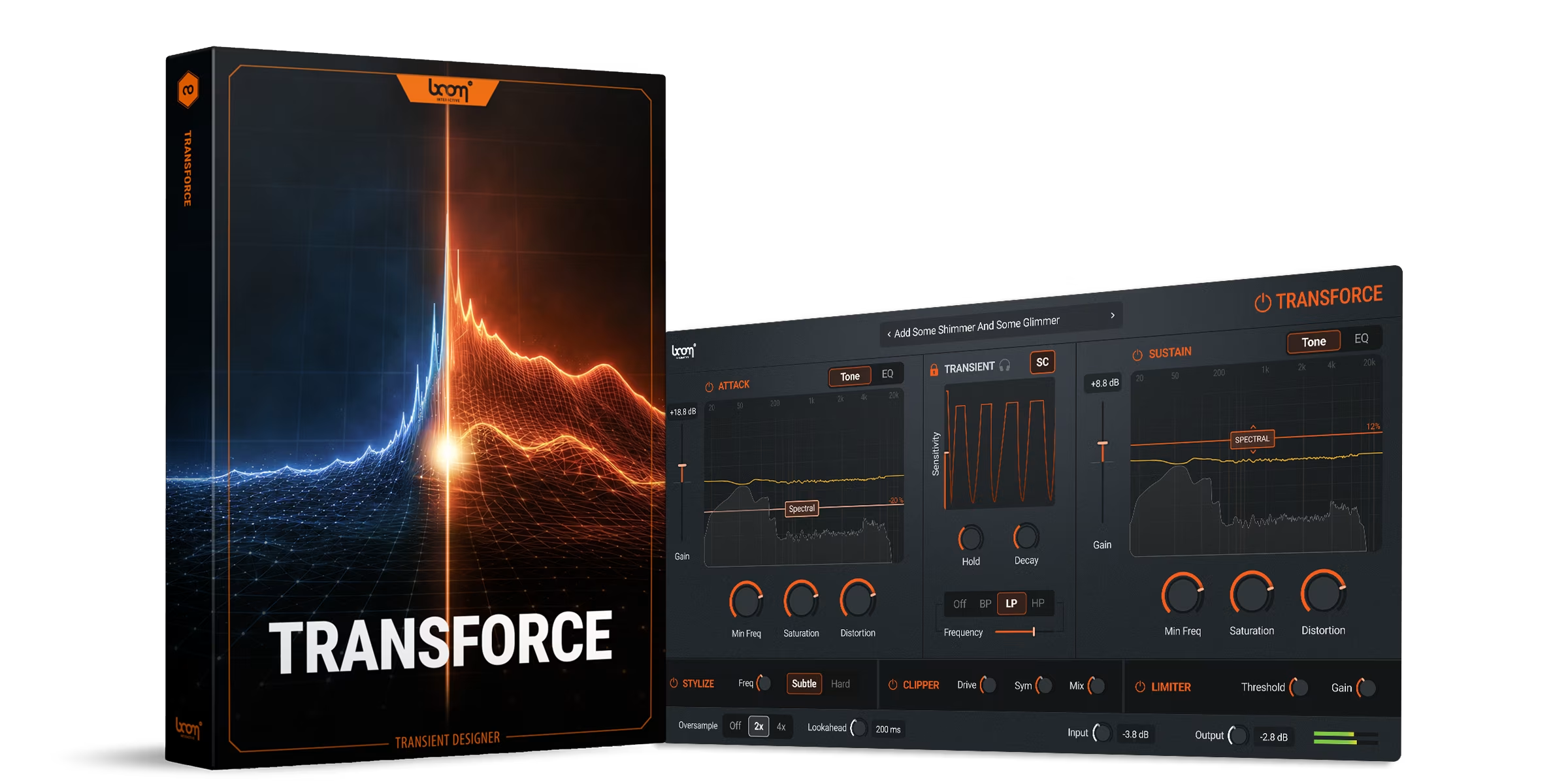
Transient shapers are not new. There have been good ones on the market for a long time. The trouble is that almost all of them were built for music production and adopted by sound design as the best option available. The features tend to reflect that, as do the presets.
TRANSFORCE is the first transient shaper that starts from the other end. It was designed by sound designers, for sound design workflows, and the difference shows up in the feature set as much as the philosophy. We sat down with product lead Jannik to talk through how it came together.
The Starting Point
Sound design is full of moments where a sound is almost right. For example, the impact has weight, but the attack is too soft. In music production, this is often where transient shapers do the heavy lifting. Or the texture sits well in the mix, but the resonance is fighting the dialogue. The hit lands, but the body doesn’t sustain the way the picture demands. These are not problems with the source material, but problems with the relationship between attack and sustain.
Jannik’s starting point with TRANSFORCE was straightforward. Treat attack and sustain as two separate creative decisions, and more importantly, give the designer independent control over each. Build the rest of the plugin around that idea.
“I think very often when you are working on whatever sound you’re currently doing, you’re confronted with needing to process or create impacts or make something more punchy or less punchy.”
That may sound simple, but in practice, it is the difference between shaping a sound and fighting with it.
Independent EQ And Saturation For Attack And Sustain
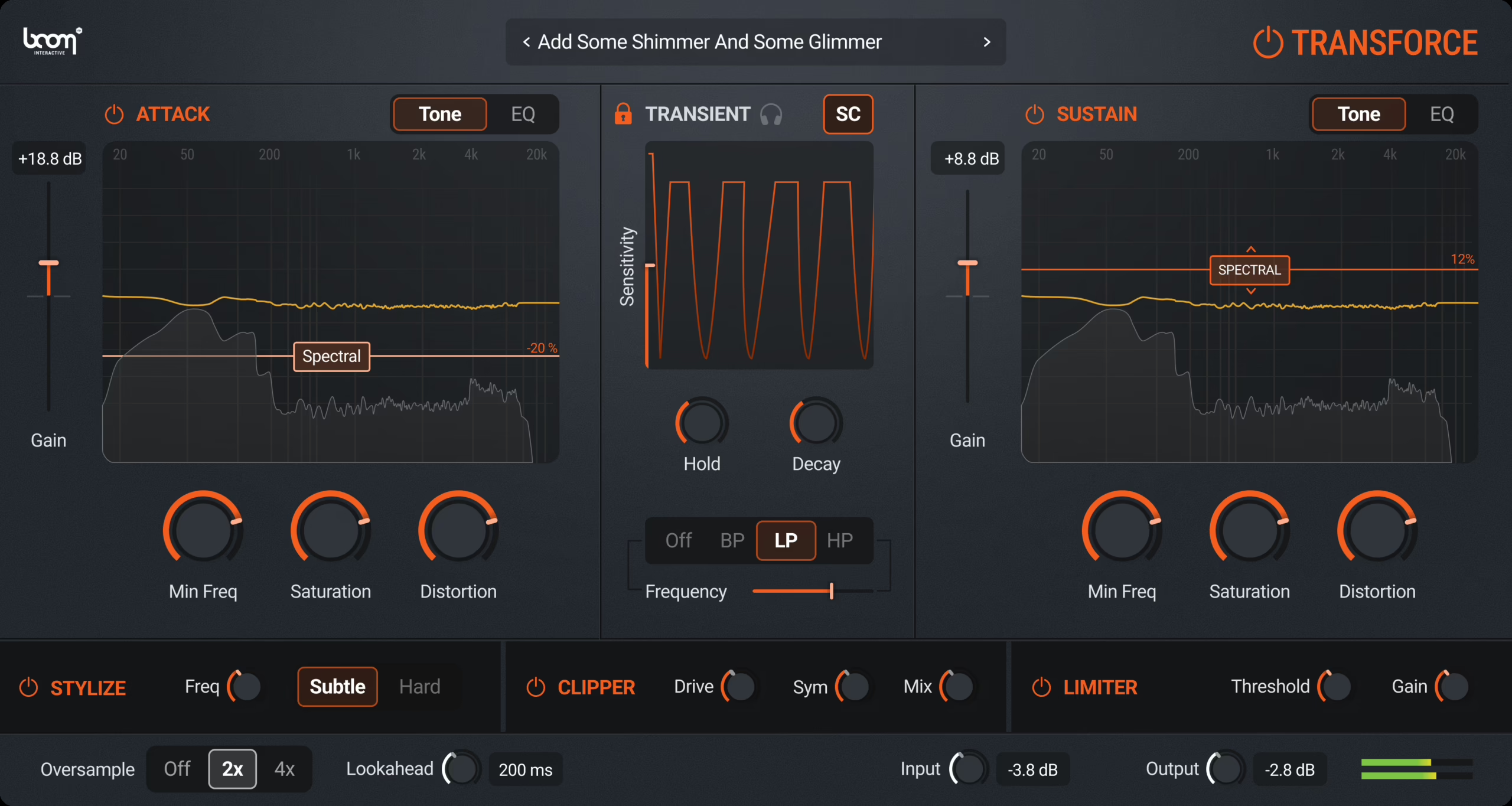
The first thing that sets TRANSFORCE apart is that attack and sustain each have their own EQ section. Three bands per side. Filter types you’d expect from a modern parametric. And, importantly, a drive control per band.
That last detail is worth highlighting. Saturating a frequency band only on the attack of a sound, while leaving the sustain untouched, is the kind of power move that solves real production problems. Of course, the opposite is true, too, where adding harmonic weight to the low end of a sustain while keeping the attack clean is the sort of thing that makes a finished sound feel finished.
The two halves of the signal are no longer competing for the same EQ curve. You shape each one for what it needs to do. It opens up all sorts of possibilities.
The Spectral Slider
The spectral slider isolates tonal resonances within a signal and lets you boost or reduce them independently of the broadband content. And it does it separately for attack and sustain.
When explaining it, Jannik gave the example of a metal impact. The attack carries a harshness that often needs taming. The sustain carries the ringing tonality that gives the impact its character. With a conventional EQ, treating one without affecting the other is difficult. The spectral slider does it cleanly because it operates only on what the ear perceives as tonal.
“You could reduce the harshness of just the impact, but leave the metal ringing in the sustain. Or the other way around.”
The same control that pulls resonance out of a metal hit can put resonance into a sci-fi element or a magic spell, adding processed tonal character to the attack while the sustain stays pure. For anyone who has spent time trying to coax that kind of behaviour out of a regular EQ, then when the penny drops, it’s a real ‘aha!’ moment.
The Transient Section
The middle of the plugin handles the attack-to-sustain ratio itself. Hold, decay, the timing of how the transient behaves. Standard transient shaper territory, but with two features worth flagging.
The first is transient monitoring. A small headphone control lets you solo the transient signal while you dial in the settings. You hear exactly what the detection is doing before you commit to it. It removes the guesswork from a part of the process that usually involves a lot of it. In many other transient tools, this level of granular detail isn’t possible.
The second is the sidechain trigger input. Transient detection can be driven by an external signal rather than the audio passing through the plugin. Send a rhythmic element into the sidechain and use it to shape a texture. Trigger a duck on a sustained pad with a percussive hit. The creative possibilities open up quickly once the two signals are separated.
That’s Not All… Stylize, Clipper, Limiter
Below the main sections sit three smaller modules. Stylize uses stacked all-pass filters to shift the phase relationship of frequencies around a target point. At low frequencies, it adds the kind of body and oomph you hear in a lot of modern production. At higher frequencies, it produces a chirped, processed character. It’s a subtle module that shows how valuable it is quickly once you start using it on impacts and weapons.
The clipper is a waveshaper with symmetry control, giving you tonal options between symmetric and asymmetric clipping. The limiter handles the output stage. It’s punchy enough to sit nicely on transient material, and quiet enough to act as a peak ceiling when that’s all you need.
Who Will Benefit From TRANSFORCE?
First, TRANSFORCE is built for professional sound designers working in film, television, and games. Game audio teams shaping large numbers of interactive sounds. Freelancers who need a transient tool that delivers both punch and precise control. The feature decisions, the presets, and the workflow all reflect that primary audience.
However, this unique processing works equally well on music sources, and there is a strong case to be made for drums, guitars, and piano benefiting from this new kind of transient plugin. It’s worth checking out our video showing TRANSFORCE in use on music production material. But the primary design intent is sound design, and that’s where TRANSFORCE earns its place first.
Getting Lost… The Good Way
Jannik describes the plugin as easy to get lost in. Not lost in a bad sense, but lost in the way you get lost with a piece of hardware that rewards experimentation. You start moving knobs to fix a specific problem, and you end up somewhere you didn’t expect.
The clipper is a waveshaper with symmetry control, giving you tonal options between symmetric and asymmetric clipping. The limiter handles the output stage. It’s punchy enough to sit nicely on transient material, and quiet enough to act as a peak ceiling when that’s all you need.
“You just start playing around with some knobs and end up with a completely different result than you would imagine when you bypass it. In the most positive way.”
That’s a quality you don’t often see designed into a utility plugin. Transient shapers are usually treated as tools to fix problems. TRANSFORCE is a plugin that wants to be played with… and rewards experimentation.
Total Transient Control
The market for transient shapers is full; if you’re going to create another one, then it has to be better. What’s been missing is one designed from within a sound design workflow rather than ported into it as the only option.
Independent EQ for attack and sustain, with saturation per band. Spectral control that operates on tonality rather than frequency. A transient section you can monitor and trigger externally. Three character modules to finish.
That’s total transient control, and something worth exploring of you work in sound.
Software / Plug‑In
Transforce
Transient Shaper Plugin
TRANSFORCE is a transient shaper plugin (VST3, AU, AAX) that processes the attack and sustain of a sound separately, with EQ and saturation for each. Drums, footsteps, impacts, dialogue, and whooshes all benefit.